Create Your First Website
1. Setup repository
How to register on Github (click to expand)
1. Go to github.com
2. Click "Sign Up"
3. Follow registration process
4. Verify your email
2. Click "Sign Up"
3. Follow registration process
4. Verify your email
Great job! By creating a GitHub account, you've taken the first step towards:
- Having a place to store and manage your code via git versioning system
- Being able to collaborate with other developers
- Getting access to version control for your projects
2. Create content
How to create index.html file (click to expand)
1. Make sure you are logged in GitHub
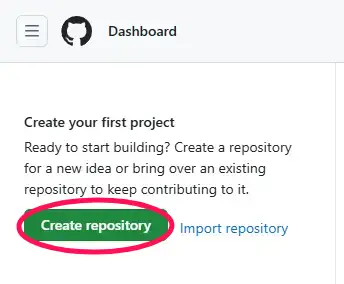
2. Click "Create repository" in top left corner
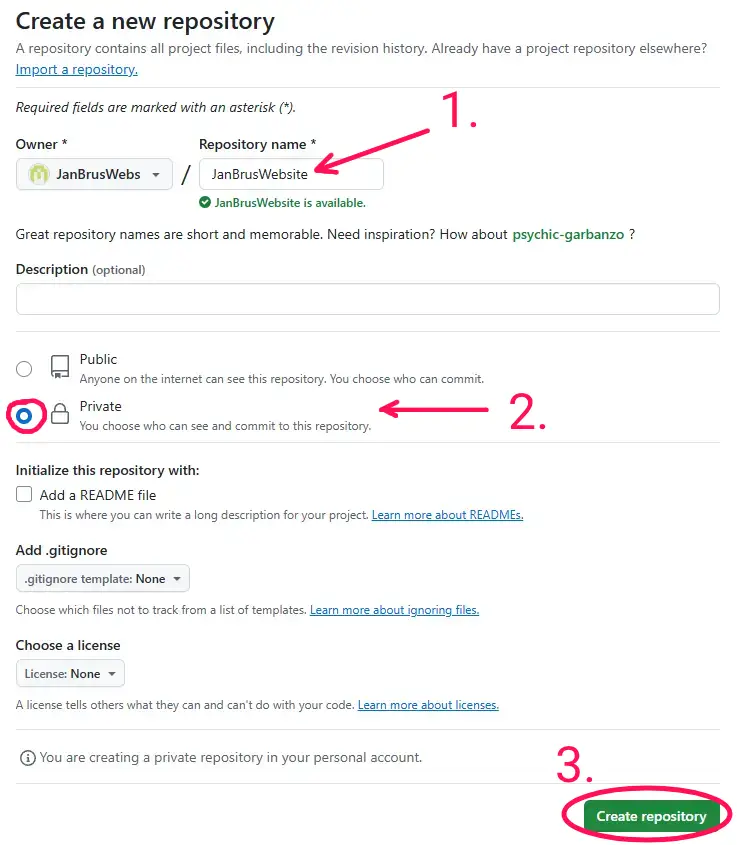
 3. Name the repository, select private, click Create repository
 4. On repository page, click on "creating a new file"
 5. Name the file index.html, put this content inside:
2. Click "Create repository" in top left corner
3. Name the repository, select private, click Create repository
4. On repository page, click on "creating a new file"
5. Name the file index.html, put this content inside:
                <!DOCTYPE html>
<html>
  <head>
   <title>My First Website</title>
  </head>
  <body>
    <h1>Hello World!</h1>
  </body>
</html>
6. Click "Commit changes..."
Great job! By creating an index.html file, you've created a file that is being used as a primary entrypoint for
any website.
3. Page is now live!
GitHub Pages is a static site hosting service that takes HTML, CSS, and JavaScript files straight from a repository on GitHub and makes them publicly available on the internet (click to expand)
1. Open your page's repository and go to Settings
2. Click Pages in the left menu
3. Click the link that looks like this: https://[your-username].github.io/[repository-name]
4. Enjoy your live website!
2. Click Pages in the left menu
3. Click the link that looks like this: https://[your-username].github.io/[repository-name]
4. Enjoy your live website!
Great job! What You've achieved so far:

- Your website is now live and accessible from anywhere in the world
- Automatic deployments whenever you update your GitHub repository
- Free hosting with HTTPS security enabled by default
Check out other tutorials
Custom domain
This tutorial will teach you to put the website on your own domain that you have to buy.
Average time to done: 5 min
Start tutorialSEO optimization
Learn how to optimize your website for search engines to get more visitors.
Average time to done: 10 min
Start tutorialAnalytics
Set up analytics to track visitors and understand how they use your website.
Average time to done: 7 min
Start tutorialCSS framework
Learn how to use CSS frameworks to make your website look professional.
Average time to done: 15 min
Start tutorial